Dokumentasi - Ping! Chatbot AI & WhatsApp CRM
Panduan lengkap untuk mengintegrasikan Webhook atau API untuk Ping! Chatbot AI
📋 Introduction
Ping! is a smart WhatsApp CRM platform that combines marketing tools, customer communication management, and AI technology—all in one dashboard.
Built with a user-friendly SaaS concept, Ping! empowers small businesses and entrepreneurs to manage customer interactions independently, efficiently, and at scale.
More than just a tool, Ping! also opens up new business opportunities for its users and is designed to be expandable through plugins and future feature integrations—similar to modular systems like WordPress and modern CMS platforms.
Main Modules
In the current version, Ping! includes 6 main modules:
- ✅ WhatsApp Chatbot (Unofficial & Official API) – For broadcasts, auto-replies, notifications, and chat handling
- ✅ Broadcast Scheduler – Send promotional messages via WhatsApp safely and gradually (anti-ban system)
- ✅ AI Chatbot (Powered by ChatGPT 4.0) – Auto-replies 24/7 even when your team is offline
- ✅ Website Live Chat Plugin – Add a chat widget to your site without any coding
- ✅ Webhook Integration – Connect with external platforms like Scalev and Lynk for automated workflows
- ✅ Customer Management – Comprehensive CRM features for managing customer relationships
🚀 Getting Started
Langkah 1: Dapatkan Webhook URL
Masuk ke halaman Settings di aplikasi Ping, lalu salin Webhook URL Anda:
- Login ke aplikasi Ping
- Buka menu Settings (
/app/settings) - Salin Webhook URL yang ditampilkan
- URL akan berbentuk:
https://chat.ping.co.id/webhook/{business_id}
Langkah 2: Konfigurasi di Scalev/Lynk
Masukkan Webhook URL ke dalam pengaturan webhook di aplikasi Scalev atau Lynk Anda.
Langkah 3: Buat Webhook Rule
Buat rule untuk menentukan kapan dan bagaimana sistem akan merespon webhook yang masuk:
- Buka menu Webhook Integrasi → Rules
- Klik Tambah Rule
- Isi form sesuai kebutuhan Anda
- Simpan rule
Untuk API
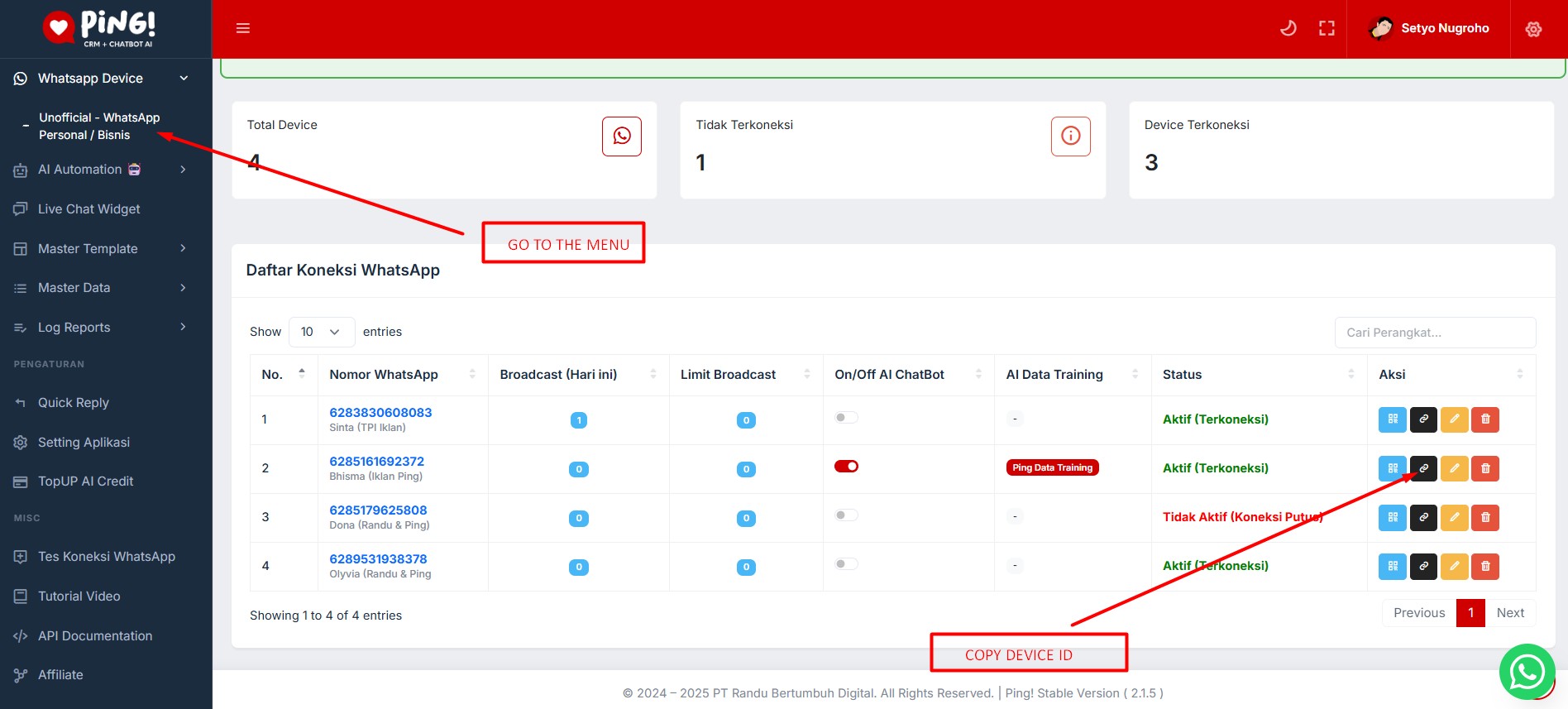
Setiap penggunaan API memerlukan Device ID. Anda dapat menyalin Device ID di menu device pada bagian Action. Contoh Device ID sebagai berikut:
03359ec3-2052-43ff-9495-6155b8cab4ccCara Mendapatkan Device ID:
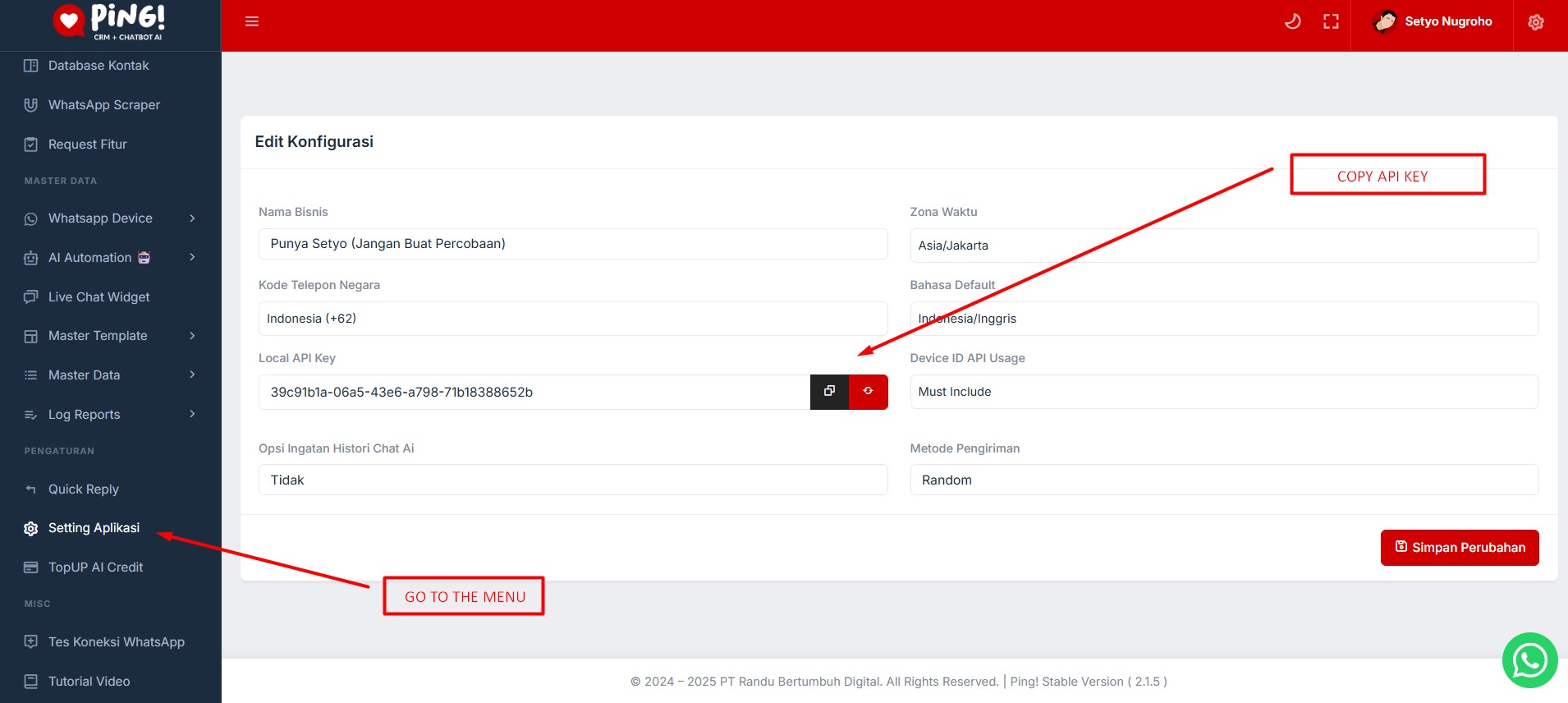
Cara Mendapatkan API Key:
🔗 Konsep Webhook
Webhook adalah cara untuk aplikasi eksternal (seperti Scalev atau Lynk) mengirimkan notifikasi real-time ke aplikasi Ping ketika suatu event terjadi.
Flow Webhook
1. Event terjadi di Scalev/Lynk (contoh: order baru dibuat)
2. Scalev/Lynk mengirim HTTP POST request ke Webhook URL Ping
3. Ping menerima payload dan memvalidasi business_id
4. Sistem mengecek apakah ada rule yang sesuai dengan kondisi payload
5. Jika ada rule yang match, sistem akan mengeksekusi action (kirim WhatsApp)
6. Hasil eksekusi dicatat di Webhook Logs
🔗 Webhook URL
Format URL
POST https://chat.ping.co.id/webhook/{business_id}Dimana {business_id} adalah UUID unik dari business Anda.
Request Headers
| Header | Value | Required |
|---|---|---|
Content-Type |
application/json |
✅ Ya |
User-Agent |
Scalev-Webhook/1.0 atau Lynk-Webhook/1.0 |
❌ Tidak |
Response Format
Success (200 OK):
{
  "status": "success",
  "message": "Webhook processed successfully",
  "rule_matched": true
}
Error (400/403/500):
{
  "status": "error",
  "message": "Error message",
  "error_code": "ERROR_CODE"
}
📦 Payload Scalev
Scalev mengirimkan payload dengan struktur berikut:
{
  "event": "order.created",
  "unique_id": "event_I7fkiBF4YksYDsKbVe5ZOEyZ",
  "timestamp": "2025-01-29T20:28:25.046183Z",
  "data": {
    "order_id": "250130JQHFZG",
    "status": "pending",
    "payment_status": "unpaid",
    "payment_method": "bank_transfer",
    "total_quantity": 1,
    "net_revenue": "149724.00",
    "gross_revenue": "168724.00",
    "destination_address": {
      "name": "Example Person",
      "phone": "628112345678",
      "email": "[email protected]",
      "address": "This is not a real address.",
      "city": "Kota Surabaya",
      "province": "Jawa Timur"
    },
    "business": {
      "username": "username"
    },
    "store": {
      "name": "Example Store"
    }
  }
}
Field Penting Scalev
| Field | Path | Deskripsi |
|---|---|---|
| Event | event |
Nama event (contoh: order.created, order.deleted) |
| Order ID | data.order_id |
ID unik order |
| Status Order | data.status |
Status order (pending, confirmed, shipped, dll) |
| Status Pembayaran | data.payment_status |
Status pembayaran (unpaid, paid, dll) |
| Nomor Telepon | data.destination_address.phone |
Nomor telepon customer |
| Nama Customer | data.destination_address.name |
Nama penerima |
📦 Payload Lynk
Lynk mengirimkan payload dengan struktur berikut:
{
  "event": "payment.received",
  "data": {
    "message_action": "SUCCESS",
    "message_code": "0",
    "message_data": {
      "refId": "13f8d23beeb2aacbbc01c94060cc88d7",
      "createdAt": "2025-04-10T14:30:45",
      "customer": {
        "name": "Lynk User",
        "email": "[email protected]",
        "phone": "0812345677889"
      },
      "totals": {
        "grandTotal": 72000,
        "totalPrice": 25000,
        "totalAddon": 50000,
        "discount": 0,
        "totalShipping": 0
      },
      "items": [
        {
          "title": "Digital Produk",
          "price": 25000,
          "qty": 1
        }
      ]
    }
  }
}
Field Penting Lynk
| Field | Path | Deskripsi |
|---|---|---|
| Event | event |
Nama event (contoh: payment.received) |
| Reference ID | data.message_data.refId |
ID referensi pembayaran |
| Waktu Pembayaran | data.message_data.createdAt |
Timestamp pembayaran |
| Nomor Telepon | data.message_data.customer.phone |
Nomor telepon customer |
| Nama Customer | data.message_data.customer.name |
Nama customer |
| Grand Total | data.message_data.totals.grandTotal |
Total pembayaran |
⚙️ Membuat Webhook Rules
Webhook Rules menentukan kapan dan bagaimana sistem akan merespon webhook yang masuk.
Langkah-langkah Membuat Rule
- Buka halaman Webhook Rules: Menu
Webhook Integrasi→Rules - Klik "Tambah Rule"
- Isi Form:
- Nama Rule: Nama untuk identifikasi rule (contoh: "Notifikasi Order Baru Scalev")
- Source: Pilih sumber webhook (Scalev, Lynk, atau Custom)
- Kondisi (JSON): Tentukan kondisi kapan rule akan dijalankan
- Template Pesan WhatsApp: Pesan yang akan dikirim ke customer
- Field Nomor Telepon: Path ke field nomor telepon di payload
- WhatsApp Device: Pilih device yang akan digunakan untuk mengirim pesan
- Status Rule: Aktifkan atau nonaktifkan rule
- Simpan Rule
🔍 Kondisi & Trigger
Kondisi menentukan kapan rule akan dijalankan. Sistem mendukung berbagai operator untuk evaluasi kondisi.
Format Kondisi (JSON)
{
  "operator": "AND",
  "rules": [
    {
      "field": "event",
      "operator": "equals",
      "value": "order.created"
    },
    {
      "field": "data.payment_status",
      "operator": "equals",
      "value": "paid"
    }
  ]
}
Operator Logika
| Operator | Deskripsi |
|---|---|
AND |
Semua kondisi harus terpenuhi |
OR |
Salah satu kondisi terpenuhi |
Operator Perbandingan
| Operator | Deskripsi | Contoh |
|---|---|---|
equals |
Sama dengan | "event" equals "order.created" |
not_equals |
Tidak sama dengan | "status" not_equals "cancelled" |
contains |
Mengandung teks | "name" contains "Product" |
exists |
Field ada / tidak kosong | "phone" exists |
greater_than |
Lebih besar dari | "total" greater_than 100000 |
less_than |
Lebih kecil dari | "quantity" less_than 10 |
Contoh Kondisi
Contoh 1: Trigger ketika order baru dibuat
{
  "operator": "AND",
  "rules": [
    {
      "field": "event",
      "operator": "equals",
      "value": "order.created"
    }
  ]
}
Contoh 2: Trigger ketika pembayaran sudah dibayar
{
  "operator": "AND",
  "rules": [
    {
      "field": "event",
      "operator": "equals",
      "value": "order.created"
    },
    {
      "field": "data.payment_status",
      "operator": "equals",
      "value": "paid"
    }
  ]
}
💬 Template Pesan WhatsApp
Template pesan mendukung placeholder yang akan diganti dengan data dari payload.
Format Placeholder
Gunakan format {{path}} untuk menambahkan data dinamis ke pesan:
Halo {{data.destination_address.name}}, terima kasih sudah order {{data.order_id}}.
Total pembayaran Anda adalah Rp {{data.net_revenue}}.
Placeholder Scalev
| Placeholder | Deskripsi |
|---|---|
{{data.order_id}} |
Order ID |
{{data.destination_address.name}} |
Nama Penerima |
{{data.destination_address.phone}} |
Nomor Telepon |
{{data.net_revenue}} |
Total Harga (Net) |
{{data.status}} |
Status Order |
Placeholder Lynk
| Placeholder | Deskripsi |
|---|---|
{{data.message_data.refId}} |
Reference ID |
{{data.message_data.customer.name}} |
Nama Customer |
{{data.message_data.totals.grandTotal}} |
Grand Total |
Contoh Template
Halo {{data.destination_address.name}},

Terima kasih sudah melakukan pemesanan di toko kami!

📦 Order ID: {{data.order_id}}
💰 Total: Rp {{data.net_revenue}}
📊 Status: {{data.status}}

Kami akan segera memproses pesanan Anda.
Tim Customer Service
📊 Monitoring Webhook Logs
Semua webhook yang diterima akan dicatat di Webhook Logs untuk monitoring dan debugging.
Akses Webhook Logs
- Buka menu Log Reports → Webhook Logs
- Anda akan melihat daftar semua webhook yang diterima
Informasi di Logs
| Kolom | Deskripsi |
|---|---|
| Waktu | Timestamp ketika webhook diterima |
| Source | Sumber webhook (Scalev, Lynk, atau Custom) |
| Status | Status eksekusi (Success, Failed, atau No Match) |
| Rule | Nama rule yang dijalankan (jika ada yang match) |
| Pesan/Error | Pesan sukses atau error message |
Filter Logs
Anda dapat memfilter logs berdasarkan:
- Source: Filter berdasarkan sumber webhook
- Status: Filter berdasarkan status (Success, Failed, No Match)
Non Official Whatsapp API
In developing Non-Official WhatsApp Tools, we use the Baileys library (https://github.com/WhiskeySockets/Baileys).
However, the published API is not directly directed to the Node server, but is repackaged by Laravel. So, the first request is sent to the API provided by Laravel.
Chats
This API focuses on getting a list of contacts stored in your WhatsApp, as well as message history based on contacts or groups. There are several endpoints currently available:
📤 Send Message
This endpoint is for sending single messages to both personal and group numbers.
Body Parameters
| Parameter | Description | Example | Requirement |
|---|---|---|---|
| phone | Fill in the number or group ID | 6281290641111 | Required |
| device_key | Device ID. Optional if system is set to auto-pick, but required if targeting group or forced by settings | bc8bae5a-0997-40a2-a827-b95adc714dd3 | Required if mandatory or sending to group |
| api_key | Your API key | XYZ987TOKEN | Required |
| method | Message method, available values: text or template |
text / template | Required |
| text | Message content, used only when method is text |
Hallo guys! | Required if method is text |
| is_group | Set true if sending to group, false if to individual |
true | Required |
Request Example
{
  "phone": "RECEIVER_NUMBER_OR_GROUP_ID",
  "device_key": "YOUR_DEVICE_ID",
  "api_key": "YOUR_API_KEY",
  "method": "text",
  "text": "Hallo guys!",
  "is_group": true
}
cURL Example
curl --location 'https://chat.ping.co.id/api-app/whatsapp/send-message' \
--header 'Content-Type: application/json' \
--data-raw '{
  "phone": "RECEIVER_NUMBER_OR_GROUP_ID",
  "device_key": "YOUR_DEVICE_ID",
  "api_key": "YOUR_API_KEY",
  "method": "text",
  "text": "Hallo guys!",
  "is_group": true
}'
Response Example
{
  "status": true,
  "message": "Berhasil mengirimkan pesan"
}
📝 Send Message With Template
The endpoint here is the same as the previous Send Message endpoint, the only difference is in the body, if in the example above we use the text method, to send a message without a template, in this endpoint we use the template method, to send a message using the template we created in Ping Dashboard
Body Parameters
| Parameter | Description | Example | Requirement |
|---|---|---|---|
| phone | Receiver phone number or WhatsApp Group ID | 6281234567890 / [email protected] | Required |
| device_key | Your WhatsApp device identifier | bc8bae5a-0997-40a2-a827-b95adc714dd3 | Required |
| api_key | Your API key | 39c91b1a-03a5-43e6-a798-73b18388652b | Required |
| method | Sending method (use template for this) |
template | Required |
| template | Whatsapp message template ID to be used | 510b32e9-d6d9-4c75-83ae-f95cdfcc96e3 | Required |
| is_group | Set true if sending to a group |
true | Optional |
| variables | Fill with the variables provided in the message template | { "{business_name}": "My Store", "{name}": "Budi" } |
Required |
Request Example
{
  "phone": "RECEIVER_NUMBER_OR_GROUP_ID",
  "device_key": "YOUR_DEVICE_ID",
  "api_key": "YOUR_API_KEY",
  "method": "template",
  "template": "YOUR_TEMPLATE_ID",
  "is_group": true,
  "variables": {
    "{business_name}": "BUSINESS_NAME",
    "{name}": "YOUR_NAME"
  }
}
cURL Example
curl --location 'https://chat.ping.co.id/api-app/whatsapp/send-message' \
--header 'Content-Type: application/json' \
--data-raw '{
  "phone": "RECEIVER_NUMBER_OR_GROUP_ID",
  "device_key": "YOUR_DEVICE_ID",
  "api_key": "YOUR_API_KEY",
  "method": "template",
  "template": "YOUR_TEMPLATE_ID",
  "is_group": true,
  "variables": {
    "{business_name}": "BUSINESS_NAME",
    "{name}": "YOUR_NAME"
  }
}'
Response Example
{
  "status": true,
  "message": "Berhasil mengirimkan pesan"
}
📞 Message Callback
This endpoint is actually created to open communication from the WhatsApp server when a WhatsApp message comes into the connected device.
But sometimes this callback will be useful when we want to do auto reply testing without having to test sending messages on WhatsApp
Body Parameters
| Parameter | Description | Example | Requirement |
|---|---|---|---|
| from | The sender's number (use [email protected] for personal chats or [email protected] for groups) |
62812906*****@s.whatsapp.net | Required |
| message_id | Unique identifier for the WhatsApp message | 18DD98462C8AA16C5A598C3DEBA0879B | Required |
| message | The content of the message | Hello | Required |
| from_name | Name of the sender | Bhisma Kalijaga | Required |
| type | Type of message, typically set to single |
single | Required |
Request Example
{
  "from": "62812906*****@s.whatsapp.net",
  "message_id": "18DD98462C8AA16C5A598C3DEBA0879B",
  "message": "Halo",
  "from_name": "Bhisma Kalijaga",
  "type": "single"
}
cURL Example
curl --location 'https://chat.ping.co.id/api-app/whatsapp/callback/device_03359ec3-2052-43ff-9495-6155b8cab4cc' \
--header 'Content-Type: application/json' \
--data-raw '{
    "from": "62812906*****@s.whatsapp.net",
    "message_id": "18DD98462C8AA16C5A598C3DEBA0879B",
    "message": "Halo",
    "from_name": "Bhisma Kalijaga",
    "type": "single"
}'
Response Example
{
  "message": {
    "text": "API Doc Ping Example"
  },
  "receiver": "6281290*****@s.whatsapp.net",
  "session_id": "device_03359ec3-2052-43ff-9495-6155b8cab4cc",
  "autoread": false,
  "reply": true
}
🔗 Webhook Sample (Custom Webhook)
Fitur Custom Webhook memungkinkan Anda menerima notifikasi real-time ketika WhatsApp device menerima pesan baru. Webhook akan otomatis dikirim ke URL yang Anda konfigurasi di pengaturan device.
📋 Cara Setup
- Buka menu Device di dashboard Ping!
- Pilih atau buat device WhatsApp yang ingin dikonfigurasi
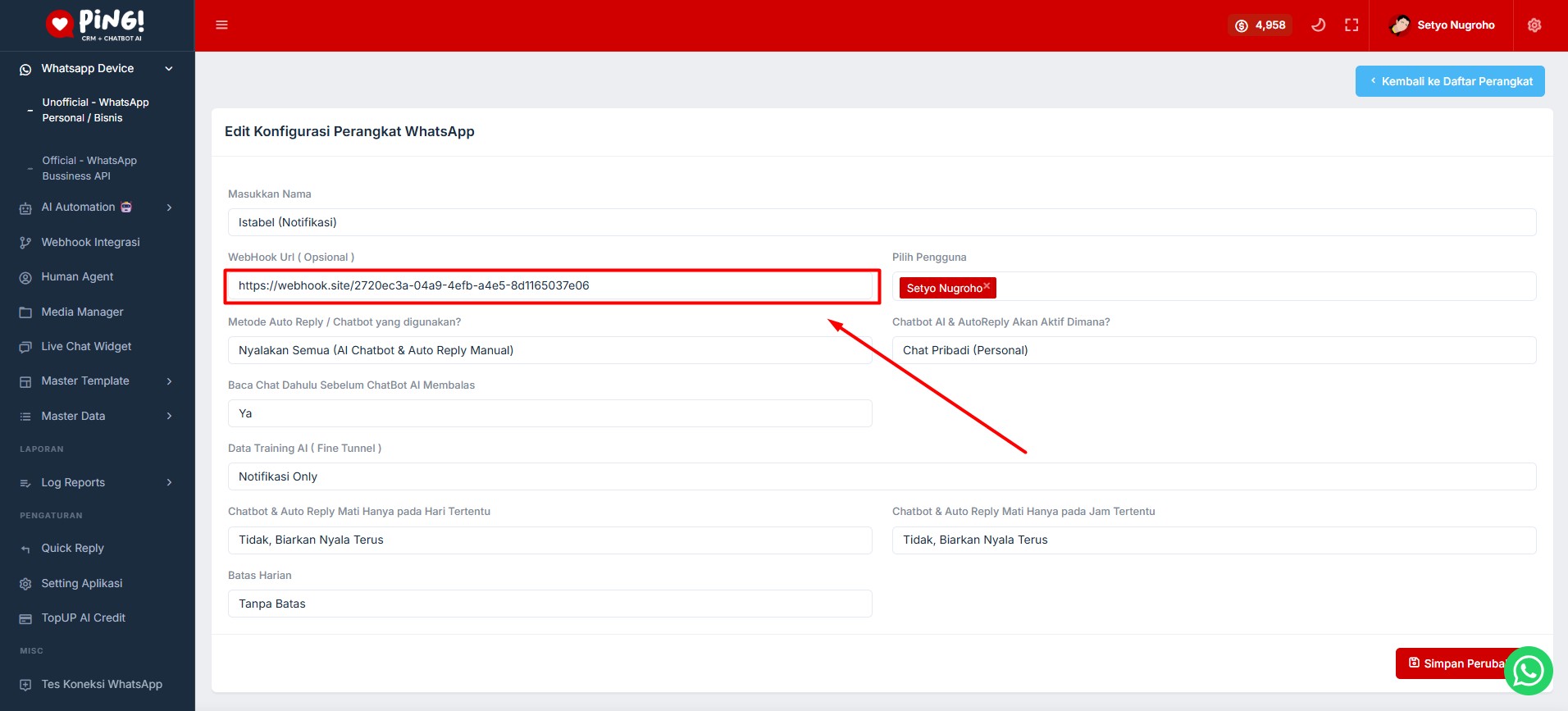
- Isi field "WebHook Url" dengan URL endpoint Anda (contoh:
https://yourdomain.com/webhook) - Simpan perubahan
Catatan: URL webhook harus dapat diakses dari internet dan menerima request POST dengan Content-Type: application/json
⚙️ Kondisi Webhook Dikirim
Webhook akan dikirim jika semua kondisi berikut terpenuhi:
- ✅ Webhook URL sudah dikonfigurasi di device
- ✅ Device menerima pesan baru (teks atau file/image)
- ✅ Paket langganan Anda aktif
📦 Payload Structure
Webhook akan mengirim payload dalam format JSON dengan struktur berikut:
Body Parameters
| Parameter | Description | Example | Type |
|---|---|---|---|
device_key |
Unique identifier untuk device WhatsApp yang menerima pesan | 7eab82d8-805a-4828-97e5-70a699027c4c | String (UUID) |
name |
Nama pengirim pesan (dari WhatsApp contact) | John Doe | String |
from |
Nomor telepon pengirim (tanpa @s.whatsapp.net) | 6281234567890 | String |
message |
Isi pesan yang diterima (teks). Null jika hanya file/image tanpa teks | Halo, ini pesan test | String | Null |
type |
Tipe pesan. Biasanya "single" untuk pesan personal | single | String |
file_url |
URL lengkap file/gambar (hanya ada jika pesan mengandung file/gambar) | https://chat.ping.co.id/uploads/media-manager/image_123.jpg | String | Null |
file_type |
MIME type file (hanya ada jika pesan mengandung file/gambar) | image/jpeg, video/mp4, application/pdf | String | Null |
file_size |
Ukuran file dalam bytes (hanya ada jika pesan mengandung file/gambar) | 123456 | Integer | Null |
file_category |
Kategori file: image, video, audio, pdf, file (hanya ada jika pesan mengandung file/gambar) | image, video, audio, pdf, file | String | Null |
file_url, file_type, file_size, dan file_category hanya akan muncul di payload jika pesan yang diterima mengandung file atau gambar (baik dengan teks maupun tanpa teks).
Request Example
{
    "device_key": "7eab82d8-805a-4828-97e5-70a699027c4c",
    "name": "John Doe",
    "from": "6281234567890",
    "message": "Halo, ini pesan test",
    "type": "single"
}
Contoh Payload untuk Pesan dengan Teks + File/Image
Jika pesan berisi teks dan file/gambar, payload akan menyertakan informasi file:
{
    "device_key": "7eab82d8-805a-4828-97e5-70a699027c4c",
    "name": "John Doe",
    "from": "6281234567890",
    "message": "Ini pesan dengan gambar",
    "type": "single",
    "file_url": "https://chat.ping.co.id/uploads/media-manager/image_123.jpg",
    "file_type": "image/jpeg",
    "file_size": 123456,
    "file_category": "image"
}
Contoh Payload untuk Pesan Hanya File/Image (Tanpa Teks)
Jika pesan hanya berisi file/image tanpa teks, field message akan berisi null, tetapi informasi file tetap tersedia:
{
    "device_key": "7eab82d8-805a-4828-97e5-70a699027c4c",
    "name": "Jane Smith",
    "from": "6289876543210",
    "message": null,
    "type": "single",
    "file_url": "https://chat.ping.co.id/uploads/media-manager/video_456.mp4",
    "file_type": "video/mp4",
    "file_size": 2345678,
    "file_category": "video"
}
Contoh Payload untuk Berbagai Tipe File
Audio:
{
    "device_key": "7eab82d8-805a-4828-97e5-70a699027c4c",
    "name": "Audio User",
    "from": "6281111111111",
    "message": "Voice note",
    "type": "single",
    "file_url": "https://chat.ping.co.id/uploads/media-manager/audio_789.mp3",
    "file_type": "audio/mpeg",
    "file_size": 567890,
    "file_category": "audio"
}
PDF/Dokumen:
{
    "device_key": "7eab82d8-805a-4828-97e5-70a699027c4c",
    "name": "Document User",
    "from": "6282222222222",
    "message": "Ini dokumen",
    "type": "single",
    "file_url": "https://chat.ping.co.id/uploads/media-manager/document_abc.pdf",
    "file_type": "application/pdf",
    "file_size": 345678,
    "file_category": "pdf"
}
cURL Example (Testing)
Anda dapat menggunakan cURL untuk testing endpoint webhook Anda:
curl --location 'https://yourdomain.com/webhook' \
--header 'Content-Type: application/json' \
--data-raw '{
    "device_key": "7eab82d8-805a-4828-97e5-70a699027c4c",
    "name": "John Doe",
    "from": "6281234567890",
    "message": "Halo, ini pesan test",
    "type": "single"
}'
⚠️ Catatan Penting
- Webhook tidak dikirim jika:
- Paket langganan tidak aktif
- Webhook URL tidak dikonfigurasi
- Pesan adalah reaction, sticker, atau disappearing message
- Timeout: Request webhook memiliki timeout 10 detik. Pastikan endpoint Anda merespons dengan cepat.
- Error Handling: Jika webhook gagal dikirim (timeout, network error, dll), sistem akan silent fail dan tidak mengganggu proses utama.
🔍 Testing Webhook
Untuk testing webhook, Anda dapat menggunakan layanan berikut:
- Webhook.site: https://webhook.site - Dapatkan URL unik untuk testing
- RequestBin: https://requestbin.com - Alternatif untuk testing webhook
- ngrok: Untuk testing webhook di local development
🐛 Troubleshooting
Error: INVALID_BUSINESS_ID
Solusi: Pastikan Anda menggunakan Webhook URL yang benar dari halaman Settings.
Error: PACKAGE_NOT_ACTIVE
Solusi: Perpanjang paket langganan Anda untuk menggunakan fitur webhook.
Webhook Tidak Terkirim
- ✅ Pastikan rule sudah dibuat dan statusnya Aktif
- ✅ Pastikan kondisi rule sesuai dengan payload yang dikirim
- ✅ Pastikan WhatsApp Device sudah dipilih dan statusnya Active
- ✅ Cek Webhook Logs untuk melihat detail error
Pesan WhatsApp Tidak Terkirim
- ✅ Pastikan nomor telepon di payload valid
- ✅ Pastikan Field Nomor Telepon sudah diisi dengan benar
- ✅ Pastikan WhatsApp Device terhubung dan aktif
- ✅ Cek Webhook Logs untuk melihat error message
📝 Changelog
Berikut adalah daftar perubahan dan update yang telah dilakukan pada platform Ping! Chatbot AI & WhatsApp CRM.
29 Desember 2025
Penambahan fitur label pada beberapa modul:
- ✅ Label pada CRM - Organisasi kontak dan data customer lebih mudah
- ✅ Label pada Database Kontak - Kategorisasi kontak yang lebih fleksibel
- ✅ Label pada Broadcast WhatsApp Unofficial - Segmentasi target broadcast lebih akurat
- ✅ Label pada Upselling Campaign - Manajemen campaign yang lebih terstruktur
20 Desember 2025
New CRM Omnichannel Layout - Redesign antarmuka CRM dengan desain modern yang lebih intuitif dan user-friendly. Membantu tim Anda mengelola komunikasi dari berbagai channel dalam satu dashboard yang terintegrasi.
15 Desember 2025
Official WhatsApp Business API Integration - Integrasi resmi dengan WhatsApp Business API sebagai partner Meta. Fitur ini memberikan akses ke WhatsApp Business API dengan tingkat deliverability yang lebih tinggi dan fitur-fitur profesional untuk bisnis skala enterprise.
10 Desember 2025
Integration Webhook to Scalev & Lynk - Integrasi webhook dengan platform Scalev dan Lynk untuk otomatisasi workflow. Memungkinkan pengiriman notifikasi WhatsApp otomatis berdasarkan event dari sistem e-commerce Anda.
09 Desember 2025
API Integration Webhook - Peluncuran fitur API untuk integrasi webhook custom. Memungkinkan Anda menerima notifikasi real-time ketika WhatsApp device menerima pesan baru, dengan konfigurasi endpoint webhook sesuai kebutuhan.
05 Desember 2025
Sistem level akses untuk Human Agent:
- 🔑 Super Admin - Akses penuh ke semua fitur dan pengaturan
- 👤 Admin - Akses untuk manajemen tim dan konfigurasi
- 👷 Staff - Akses terbatas untuk operasional harian
01 Desember 2025
Affiliate Program Ping - Program affiliate dengan komisi recurring 15% untuk setiap referral yang berhasil. Program ini memberikan kesempatan untuk mendapatkan passive income dengan mengajak pengguna lain bergabung ke platform Ping!